EN
EN

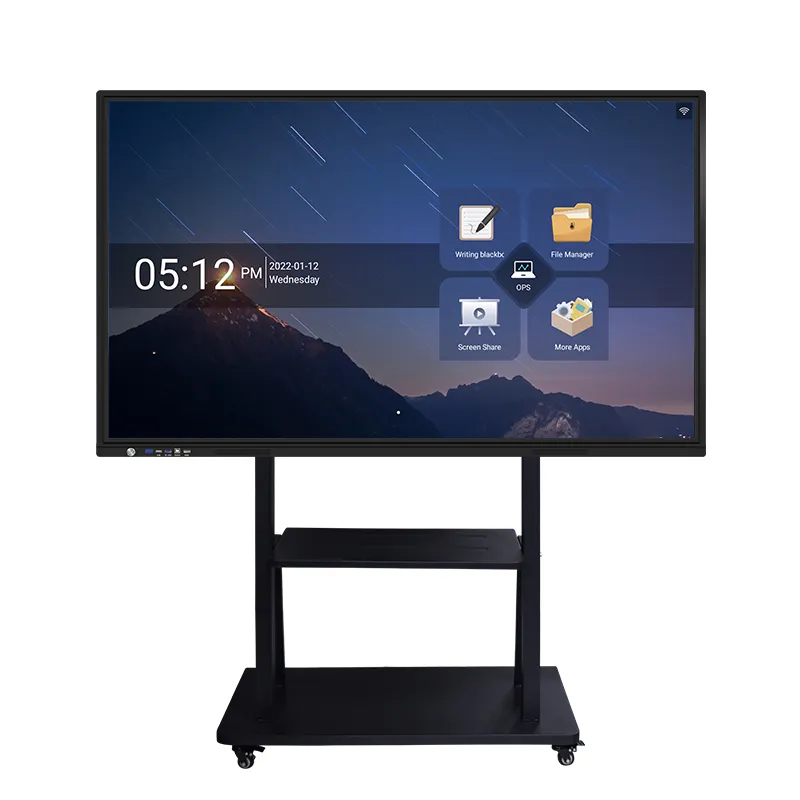
Modern classrooms are evolving rapidly, and educators are constantly seeking innovative tools to enhance student engagement and learning outcomes. The integration of digital technology in educational environments has become essential for creating dynamic, collaborative learning experiences that prepare students for the digital age. Among the most transformative technologies available today, the interactive flat panel stands out as a revolutionary solution that fundamentally changes how teachers and students interact with educational content.
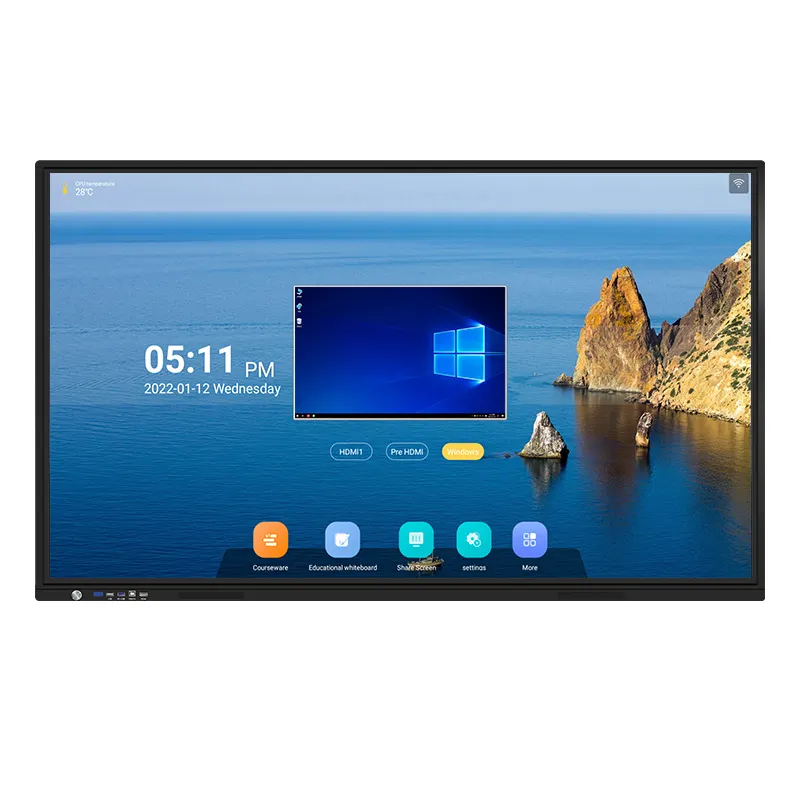
These sophisticated educational displays represent a significant advancement from traditional whiteboards and projectors, offering unprecedented capabilities for collaborative learning. An interactive flat panel combines the functionality of a computer, projector, and whiteboard into a single, powerful device that responds to touch and stylus input. The technology enables seamless integration of multimedia content, real-time collaboration, and interactive presentations that captivate student attention and foster deeper learning engagement.
Educational institutions worldwide are recognizing the transformative potential of interactive display technology in creating more effective learning environments. The shift toward collaborative learning methodologies has made these advanced display solutions increasingly valuable for modern pedagogy. Teachers can now facilitate group activities, encourage student participation, and create immersive learning experiences that were previously impossible with conventional classroom equipment.
Enhanced Student Engagement Through Interactive Technology
Multi-Touch Capabilities and Simultaneous User Interaction
The interactive flat panel revolutionizes classroom dynamics by supporting multiple simultaneous touch points, allowing several students to work together on the same display surface. This multi-touch functionality enables collaborative problem-solving activities where students can manipulate objects, draw diagrams, or input data simultaneously without waiting for turns. The technology recognizes individual touch gestures and responds accurately to each user's input, creating a truly collaborative workspace that mirrors real-world teamwork scenarios.
Advanced touch recognition technology ensures that the interactive flat panel can distinguish between intentional touches and accidental contact, providing precise control for educational activities. Students can zoom in on specific content areas, rotate images, or move elements around the screen with natural gesture controls. This intuitive interaction model reduces the learning curve associated with new technology adoption and allows students to focus on educational content rather than struggling with technical barriers.
Visual Learning Enhancement and Content Presentation
Visual learners benefit tremendously from the high-resolution display capabilities of modern interactive flat panel systems. These devices typically feature 4K Ultra HD resolution that presents text, images, and videos with exceptional clarity and vibrant colors. The superior image quality ensures that all students, regardless of their seating position in the classroom, can clearly see and interact with displayed content.
The large screen format of an interactive flat panel, commonly available in sizes ranging from 65 to 85 inches, provides ample workspace for complex collaborative projects. Students can work together on detailed diagrams, mathematical equations, or creative presentations without feeling constrained by limited display area. The expansive digital canvas encourages creativity and allows for comprehensive visual representations of learning concepts.
Collaborative Learning Features and Educational Applications
Real-Time Document Sharing and Group Projects
Contemporary interactive flat panel solutions include sophisticated software platforms that facilitate seamless document sharing and collaborative editing. Students can connect their personal devices to the display system and share their work instantly, enabling peer review sessions and group discussions around specific content. The ability to display multiple student screens simultaneously allows teachers to compare different approaches to problem-solving and highlight diverse perspectives within the classroom.
Cloud-based integration features enable students to access and save their collaborative work from any location, extending learning opportunities beyond the physical classroom environment. The interactive flat panel serves as a central hub for group projects, allowing team members to contribute content, make revisions, and track project progress in real-time. This collaborative workflow prepares students for modern workplace environments where digital collaboration tools are essential for productivity.
Interactive Whiteboard Functionality and Annotation Tools
The digital whiteboard capabilities of an interactive flat panel provide unlimited possibilities for creative expression and knowledge visualization. Unlike traditional whiteboards with limited space and erasing constraints, digital whiteboard software offers infinite canvas space, multiple page options, and advanced drawing tools. Students can create mind maps, flowcharts, and complex diagrams using various colors, shapes, and text formatting options.
Annotation features allow students and teachers to mark up imported documents, images, or videos with notes, highlights, and drawings. These annotations can be saved, shared, and referenced in future lessons, creating a comprehensive digital record of classroom discussions and collaborative insights. The ability to overlay digital annotations on any content type transforms static materials into interactive learning resources that engage students more effectively than traditional presentation methods.
Technical Integration and Classroom Management Benefits
Wireless Connectivity and Device Integration
Modern interactive flat panel systems feature comprehensive wireless connectivity options that support various devices and operating systems. Students can connect tablets, laptops, smartphones, and other digital devices to the display system without cables or complex setup procedures. This seamless integration capability encourages students to use their familiar devices as collaborative tools while benefiting from the large-format display and advanced interaction features.
Screen mirroring functionality allows teachers to display content from any connected device instantly, facilitating spontaneous sharing of student work or external resources. The interactive flat panel can simultaneously display content from multiple devices, enabling comparison activities and collaborative analysis of different materials or approaches.
Classroom Management and Administrative Features
Advanced classroom management software integrated with interactive flat panel systems provides teachers with powerful tools for controlling and monitoring collaborative activities. Teachers can manage student device connections, control access to specific applications or websites, and monitor individual student progress during group activities. These management features ensure that technology use remains focused on educational objectives while maintaining classroom discipline and engagement.
Built-in assessment tools allow teachers to create interactive quizzes, polls, and surveys that students can complete directly on the interactive flat panel or their connected devices. Real-time response tracking provides immediate feedback on student understanding and enables teachers to adjust their instructional approach based on collective class performance. This data-driven approach to education helps optimize learning outcomes and identifies areas where additional collaborative activities might be beneficial.
Pedagogical Advantages and Learning Outcomes
Active Learning Promotion and Student Participation
The interactive nature of flat panel displays naturally encourages active learning methodologies that have been proven to improve educational outcomes. Students become active participants rather than passive observers when working with interactive technology. The hands-on approach to content manipulation and creation engages multiple learning modalities simultaneously, accommodating diverse learning styles and preferences within a single classroom environment.
Research indicates that students demonstrate improved retention rates and deeper conceptual understanding when learning involves interactive manipulation of digital content. The interactive flat panel facilitates this type of engaged learning by providing immediate visual feedback to student actions and enabling experimentation with different approaches to problem-solving. Collaborative activities conducted on these devices often result in more comprehensive understanding as students learn from peer interactions and diverse perspectives.
Skills Development for Digital Literacy
Exposure to interactive flat panel technology helps students develop essential digital literacy skills that are increasingly important in academic and professional contexts. Students learn to navigate complex software interfaces, collaborate using digital tools, and create multimedia presentations that combine text, images, and interactive elements. These technical skills complement traditional academic learning and prepare students for technology-rich environments they will encounter in higher education and careers.
The collaborative aspects of interactive flat panel use also develop important soft skills such as communication, teamwork, and problem-solving. Students must negotiate shared workspace usage, communicate ideas effectively to peers, and work together to achieve common goals. These social and collaborative skills are essential for success in modern educational and professional environments where teamwork and digital collaboration are standard practices.
Implementation Considerations and Best Practices
Teacher Training and Professional Development
Successful integration of interactive flat panel technology requires comprehensive teacher training programs that address both technical operation and pedagogical applications. Educators need to understand how to operate the hardware and software features while also learning how to design collaborative activities that maximize the educational benefits of the technology. Professional development programs should include hands-on practice sessions and ongoing support to ensure teachers feel confident using the technology in their classrooms.
Effective training programs focus on practical applications rather than theoretical concepts, providing teachers with specific lesson plan ideas and collaborative activity templates that can be immediately implemented in their classrooms. Peer mentoring programs where experienced interactive flat panel users support newer adopters can accelerate the adoption process and ensure consistent implementation across an educational institution.
Infrastructure Requirements and Technical Support
Installing interactive flat panel systems requires adequate network infrastructure to support multiple simultaneous device connections and cloud-based application usage. High-speed internet connectivity and robust wireless networks are essential for optimal performance during collaborative activities. Educational institutions should assess their current infrastructure capabilities and upgrade network equipment as necessary to support interactive flat panel functionality.
Ongoing technical support arrangements ensure that interactive flat panel systems continue to function optimally and teachers receive assistance when encountering technical challenges. Regular software updates, hardware maintenance, and user support services are critical for maintaining the educational value of these technology investments. Institutions should establish clear support procedures and provide teachers with reliable channels for technical assistance.
FAQ
What makes an interactive flat panel more effective than traditional projectors for collaborative learning
Interactive flat panel displays offer superior image quality, direct touch interaction, and multi-user capabilities that traditional projectors cannot match. The high-resolution display ensures clear visibility from all classroom positions, while touch functionality enables direct manipulation of content without requiring separate pointing devices or complicated setup procedures. Multiple students can simultaneously interact with the display surface, fostering true collaborative engagement rather than sequential turn-taking that limits participation and reduces learning momentum.
How do interactive flat panels support different learning styles in collaborative environments
These versatile educational tools accommodate visual learners through high-quality image and video display, kinesthetic learners through direct touch interaction and gesture controls, and auditory learners through integrated sound systems and multimedia content capabilities. The collaborative features enable peer-to-peer learning that benefits social learners, while individual interaction options support independent workers. The variety of available software applications and content types ensures that diverse learning preferences and academic subjects can be effectively addressed within collaborative classroom activities.
What technical specifications should schools consider when selecting an interactive flat panel
Key technical considerations include display resolution (4K recommended for optimal clarity), touch point recognition (minimum 10 simultaneous touches for effective collaboration), screen size appropriate for classroom dimensions (typically 65-85 inches), wireless connectivity options supporting multiple device types, integrated computing capabilities to reduce external hardware requirements, and robust construction designed for frequent educational use. Additionally, software compatibility with existing educational applications and content management systems should be evaluated to ensure seamless integration with current teaching resources.
How can schools measure the effectiveness of interactive flat panel implementation for collaborative learning
Educational effectiveness can be assessed through student engagement metrics, academic performance comparisons before and after implementation, teacher feedback surveys regarding classroom management and instructional capabilities, and observation of collaborative behavior patterns during group activities. Usage analytics from the interactive flat panel software can provide quantitative data about feature utilization and student participation levels. Long-term assessment should include student retention rates, standardized test score improvements, and graduate feedback about preparation for technology-rich environments in higher education or career settings.
Table of Contents
- Enhanced Student Engagement Through Interactive Technology
- Collaborative Learning Features and Educational Applications
- Technical Integration and Classroom Management Benefits
- Pedagogical Advantages and Learning Outcomes
- Implementation Considerations and Best Practices
-
FAQ
- What makes an interactive flat panel more effective than traditional projectors for collaborative learning
- How do interactive flat panels support different learning styles in collaborative environments
- What technical specifications should schools consider when selecting an interactive flat panel
- How can schools measure the effectiveness of interactive flat panel implementation for collaborative learning