EN
EN

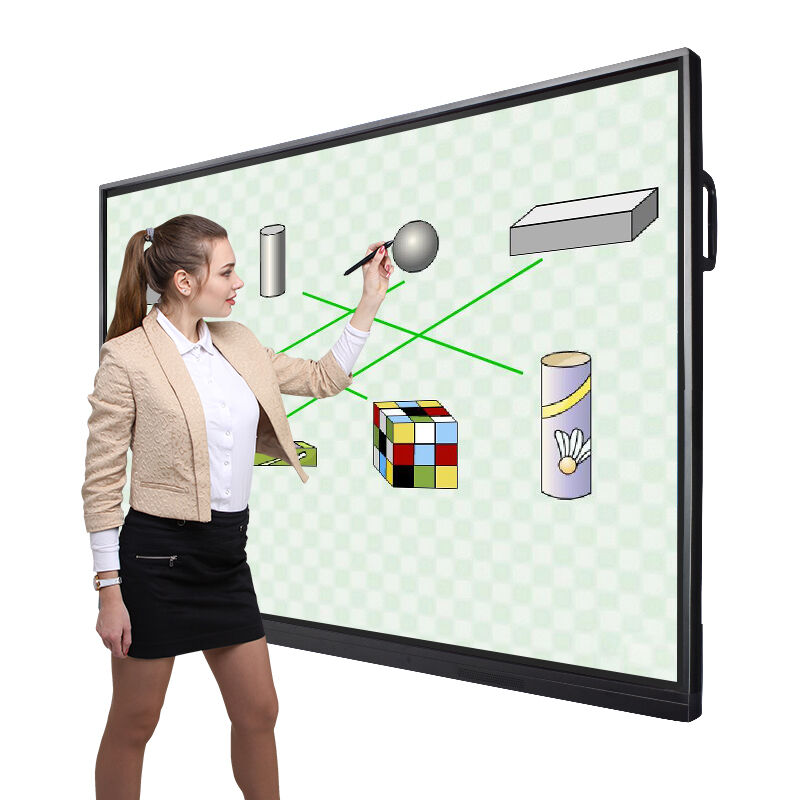
The modern classroom demands tools that go beyond static displays and passive instruction. An interactive whiteboard addresses that demand directly by transforming how teachers present content, how students respond, and how lessons flow from start to finish. Rather than simply replacing a traditional chalkboard, an interactive whiteboard introduces a layer of digital intelligence that reshapes the entire instructional experience.
Understanding how an interactive whiteboard improves teaching efficiency requires looking at specific mechanisms: how it changes lesson delivery, how it supports real-time student participation, and how it reduces the friction that typically slows classroom workflows. Each of these mechanisms contributes directly to a more productive and engaging learning environment, making the interactive whiteboard one of the most impactful investments a school can make in instructional technology.
Streamlining Lesson Delivery with an Interactive Whiteboard
Faster Content Presentation and Annotation
One of the clearest ways an interactive whiteboard improves teaching efficiency is by accelerating how content is presented. Teachers can load pre-built lesson files, switch between video, image, and document formats instantly, and annotate directly on any content without pausing to erase or rewrite. This eliminates the dead time that accumulates when instructors must manually update a traditional board, allowing more instructional minutes per class session.
With an interactive whiteboard, a science teacher can pull up a diagram, highlight key structures with a touch, add color-coded notes in real time, and save the annotated version for student review. This workflow compresses what might have taken three separate steps into one continuous flow. The interactive whiteboard does not just save time; it makes the teaching itself more coherent and visually organized.
Integration with Digital Resources
An interactive whiteboard connects seamlessly with digital libraries, cloud storage, and educational software. Teachers no longer need to switch between a laptop, a projector, and a separate display. The interactive whiteboard serves as a unified hub where all digital assets converge. This integration means that lesson transitions are smooth, and instructors spend less time managing technology and more time managing learning.
When a teacher uses an interactive whiteboard to pull live data or demonstrate software in real time, students follow along with greater clarity. The interactive whiteboard removes the cognitive gap that appears when content must be described verbally rather than shown visually. This directness in delivery is a core reason the interactive whiteboard consistently improves lesson efficiency across subjects.
Boosting Student Engagement Through the Interactive Whiteboard
Touch-Based Participation and Collaborative Activities
Engagement is a prerequisite for efficient learning, and the interactive whiteboard is specifically designed to drive it. Because the interactive whiteboard supports multi-touch input, multiple students can interact with the display simultaneously. A math teacher can invite two students to solve different parts of an equation on the interactive whiteboard at the same time, keeping the class active rather than passive.
This touch-based interaction changes the social dynamic of a classroom. Students who might disengage from a lecture-style lesson remain attentive when they know they may be called to the interactive whiteboard to contribute. The interactive whiteboard creates accountability and curiosity simultaneously. Teachers report that lessons involving the interactive whiteboard generate noticeably higher rates of voluntary participation compared to conventional instruction.
Visual and Multimedia Learning Support
The interactive whiteboard supports video playback, animated diagrams, and interactive simulations that static media cannot replicate. A history teacher explaining a battle strategy can use the interactive whiteboard to overlay troop movements on a map, creating a dynamic visual narrative. This kind of presentation retains student attention far more effectively than a printed worksheet or a spoken description.

For students who are visual or kinesthetic learners, the interactive whiteboard becomes a critical tool for comprehension. When students interact physically with content displayed on the interactive whiteboard, the material moves from passive observation to active processing. This shift directly improves retention and reduces the need for repeated review, which in turn increases overall teaching efficiency.
Reducing Administrative Friction with the Interactive Whiteboard
Saving and Sharing Lesson Content Instantly
Every minute a teacher spends on administrative tasks is a minute not spent on instruction. The interactive whiteboard addresses this by allowing teachers to save entire annotated sessions with a single tap. Notes written on the interactive whiteboard during class can be exported and distributed to students instantly, eliminating the need for separate handouts or post-class note compilation.
This capability also benefits absent students, who can receive the full visual record of a lesson rather than relying on secondhand notes. The interactive whiteboard creates a reusable content archive that teachers can draw from in future classes. Over time, this archive built through the interactive whiteboard reduces lesson preparation time significantly, compounding efficiency gains across an entire academic term.
Supporting Remote and Hybrid Classroom Models
The interactive whiteboard integrates with video conferencing platforms, making it a central tool for hybrid teaching environments. When some students attend in person and others join remotely, the interactive whiteboard ensures that both groups see the same live content and annotations. This parity in the learning experience is difficult to achieve without an interactive whiteboard as the anchor display.
Teachers managing split-mode classrooms find that the interactive whiteboard reduces the complexity of simultaneous in-room and online instruction. Rather than managing two separate content streams, an instructor can use the interactive whiteboard as a single source that feeds both audiences. This consolidation is one of the most practical efficiency gains the interactive whiteboard delivers in contemporary education settings.
FAQ
What subjects benefit most from using an interactive whiteboard?
An interactive whiteboard is effective across all subjects, but it delivers especially strong results in STEM fields, language arts, and social studies. Any subject that benefits from visual demonstration, real-time annotation, or interactive simulation is a strong candidate for the interactive whiteboard. Teachers in these areas report faster lesson delivery and higher student comprehension when using an interactive whiteboard consistently.
Does an interactive whiteboard require special training to use effectively?
Most modern interactive whiteboard systems are designed with intuitive touch interfaces that require minimal initial training. Teachers typically need a short orientation session to learn the core functions of an interactive whiteboard, after which practical use builds familiarity quickly. Many interactive whiteboard platforms also offer built-in tutorials and support resources to help educators get comfortable at their own pace.
How does an interactive whiteboard compare to a standard projector setup?
A projector setup displays content but does not allow direct interaction with the displayed material. An interactive whiteboard, by contrast, accepts touch and stylus input directly on the screen, enabling real-time annotation, drag-and-drop interaction, and multi-user collaboration. This interactivity is what makes the interactive whiteboard fundamentally more efficient than a projector as a teaching tool, especially in active learning environments.