EN
EN

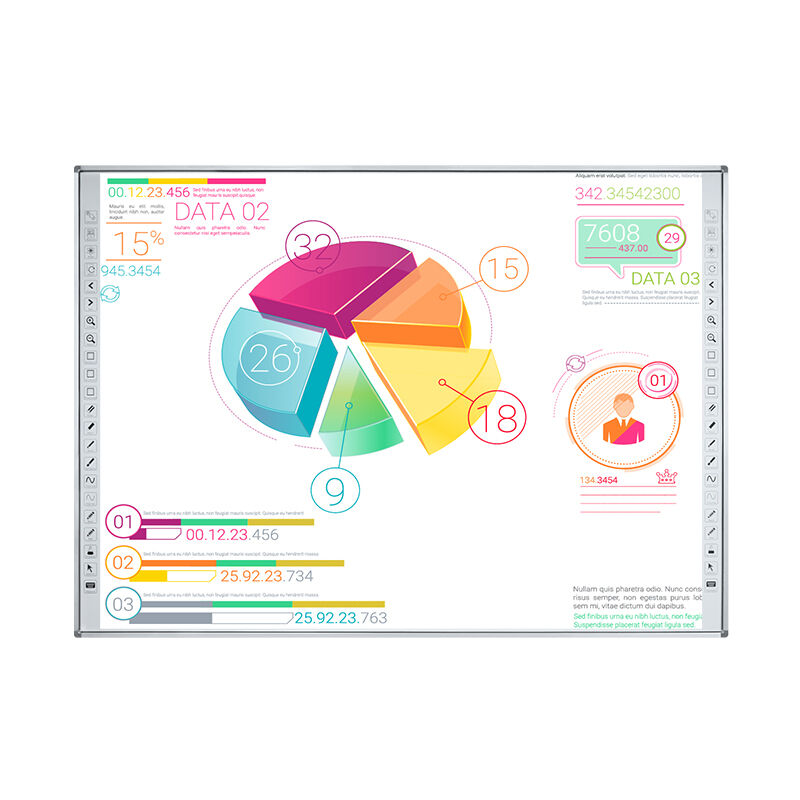
Modern classrooms and boardrooms are rapidly evolving with the integration of advanced educational technology, and at the forefront of this transformation is the smart whiteboard. These interactive display systems have revolutionized how educators teach and professionals collaborate, offering dynamic capabilities that traditional whiteboards simply cannot match. When evaluating options for your educational institution or business environment, understanding the essential features of a smart whiteboard becomes crucial for making an informed investment decision that will serve your needs for years to come.
Display Technology and Visual Quality
Screen Resolution and Clarity
The foundation of any effective smart whiteboard lies in its display technology and visual clarity. High-resolution screens ensure that text remains crisp and readable even from the back of large classrooms or conference rooms. Professional-grade smart whiteboard systems typically feature 4K Ultra HD resolution, providing exceptional detail that enhances the viewing experience for all participants. This level of clarity becomes particularly important when displaying complex diagrams, detailed charts, or fine text that requires precise visibility across various lighting conditions.
Anti-glare technology represents another critical aspect of display quality in smart whiteboard design. Educational and corporate environments often feature varied lighting conditions, including natural sunlight and artificial illumination that can create unwanted reflections. Advanced anti-glare coatings minimize these disruptions, ensuring consistent visibility regardless of ambient lighting. The combination of high resolution and anti-glare properties creates an optimal viewing environment that supports extended use without causing eye strain for users.
Color Accuracy and Brightness
Professional applications demand accurate color representation, making color fidelity a crucial consideration when selecting a smart whiteboard. Premium models incorporate advanced color calibration technology that ensures colors appear vibrant and true-to-life, which proves essential for design work, scientific presentations, and multimedia content. The brightness levels of these displays must also accommodate various room sizes and lighting conditions, with commercial-grade units typically offering brightness ratings between 350-400 nits for optimal visibility.
Dynamic brightness adjustment capabilities allow smart whiteboard systems to automatically adapt to changing environmental conditions throughout the day. This intelligent feature not only improves visibility but also extends the lifespan of display components while reducing energy consumption. The integration of ambient light sensors enables seamless transitions between different lighting scenarios, maintaining consistent image quality without manual intervention from users.
Touch Technology and Responsiveness
Multi-Touch Capabilities
The interactive capabilities of a smart whiteboard depend heavily on its touch technology implementation. Modern systems support simultaneous multi-touch recognition, allowing multiple users to interact with the display concurrently. This feature proves invaluable in collaborative environments where team members can manipulate different elements simultaneously, write notes in various areas, or work together on complex projects. Advanced touch recognition supports up to 20 simultaneous touch points, enabling truly collaborative experiences that mirror natural group dynamics.
Touch sensitivity and accuracy directly impact user satisfaction and productivity when working with smart whiteboard systems. Professional-grade models feature precision touch recognition that accurately interprets gestures, handwriting, and drawing movements with minimal lag time. This responsiveness becomes particularly important for detailed work such as mathematical equations, technical drawings, or artistic endeavors where precision matters significantly.
Stylus and Finger Recognition
Versatile input methods enhance the functionality of smart whiteboard systems by accommodating different user preferences and use cases. Quality models support both finger touch and stylus input, automatically detecting which input method is being used and adjusting sensitivity accordingly. This dual recognition capability allows for natural interaction patterns, whether users prefer the precision of a stylus for detailed work or the convenience of finger gestures for navigation and basic interactions.
Palm rejection technology represents a sophisticated feature that prevents accidental inputs when users rest their hands on the display surface while writing. This capability enables natural writing and drawing positions without interference from unintended touches, making the smart whiteboard experience more intuitive and comfortable for extended use sessions. The integration of pressure sensitivity further enhances the writing experience by varying line thickness based on applied pressure.
Software Integration and Operating Systems
Native Software Capabilities
The software ecosystem of a smart whiteboard determines its practical utility and long-term value proposition. Comprehensive native software packages typically include digital whiteboard applications, annotation tools, screen recording capabilities, and presentation software specifically optimized for touch interaction. These integrated solutions provide immediate functionality without requiring additional software purchases or complex setup procedures, making smart whiteboard deployment straightforward for organizations.
Advanced software features such as handwriting recognition convert written text into digital format, enabling easy editing and sharing of handwritten content. Shape recognition capabilities automatically convert rough drawings into perfect geometric shapes, while mathematical equation recognition can solve and format complex expressions. These intelligent features transform the smart whiteboard from a simple display into a powerful digital assistant that enhances productivity and creativity.
Third-Party Application Support
Compatibility with popular productivity and educational software expands the versatility of smart whiteboard systems significantly. Support for applications such as Microsoft Office, Google Workspace, Adobe Creative Suite, and specialized educational software ensures seamless integration with existing workflows. This compatibility eliminates the need for file conversions or specialized training, allowing users to leverage familiar tools within the interactive display environment.
Cloud-based application support enables access to vast libraries of educational content, presentation templates, and collaborative tools directly through the smart whiteboard interface. This connectivity ensures that users can access up-to-date resources and share content across multiple platforms without complex file management procedures. The ability to run web-based applications directly on the display creates unlimited possibilities for content integration and real-time collaboration.
Connectivity and Network Features
Wireless Connectivity Options
Modern smart whiteboard systems must accommodate the diverse connectivity needs of contemporary educational and business environments. Robust wireless capabilities including dual-band Wi-Fi support ensure reliable connections even in network-congested environments. The latest smart whiteboard models incorporate Wi-Fi 6 technology, providing enhanced bandwidth and reduced latency for seamless content sharing and cloud-based application performance.
Bluetooth connectivity enables effortless pairing with mobile devices, laptops, and tablets, allowing users to share content wirelessly without complicated setup procedures. This wireless freedom eliminates the constraints of physical cables and enables flexible room arrangements that support dynamic collaboration patterns. Advanced models also support multiple simultaneous connections, allowing several devices to connect and share content in sequence or simultaneously.
Wired Connection Interfaces
Despite the convenience of wireless connectivity, reliable wired connections remain essential for smart whiteboard functionality. Multiple HDMI inputs accommodate various source devices including laptops, document cameras, and media players without requiring connection switches. USB ports provide charging capabilities for mobile devices while supporting direct file access from USB storage devices, creating flexible content sharing options.
Ethernet connectivity ensures stable network access for organizations with strict network security requirements or bandwidth-intensive applications. This wired network option provides consistent performance for video conferencing, large file transfers, and real-time collaboration tools that demand reliable connectivity. The combination of wired and wireless options ensures smart whiteboard functionality remains consistent across diverse installation environments.
Audio and Video Conferencing Capabilities
Built-in Audio Systems
Integrated audio capabilities eliminate the need for separate speaker systems while providing clear sound reproduction for multimedia presentations and video conferencing applications. Professional smart whiteboard models feature strategically positioned speakers that deliver balanced audio coverage across typical classroom and conference room environments. Advanced audio processing includes automatic volume adjustment and echo cancellation features that maintain clear communication during interactive sessions.
Microphone arrays built into smart whiteboard systems enable hands-free voice interaction and clear audio pickup for video conferencing applications. These integrated microphones feature noise reduction technology that filters background sounds while amplifying speaker voices, ensuring clear communication even in busy environments. The combination of quality speakers and sensitive microphones creates a complete audio solution that supports various multimedia and collaboration requirements.
Camera Integration
High-definition cameras integrated into smart whiteboard designs support video conferencing and content capture applications without requiring additional equipment. These cameras typically feature wide-angle lenses that capture entire presentation areas while providing clear video quality for remote participants. Automatic tracking capabilities can follow presenters as they move around the display, maintaining optimal framing for video conference attendees.
Privacy considerations become important with integrated camera systems, and quality smart whiteboard models include physical camera shutters or electronic privacy controls that allow users to disable video capture when needed. Advanced camera features may include document camera functionality, enabling real-time capture and display of physical documents or three-dimensional objects for enhanced presentation capabilities.
Durability and Build Quality
Screen Protection Technology
The demanding environment of educational institutions and busy corporate settings requires smart whiteboard systems built for durability and longevity. Tempered glass surfaces provide scratch resistance and impact protection while maintaining optimal touch sensitivity and visual clarity. Anti-bacterial coatings have become increasingly important, offering protection against germs and bacteria while facilitating easy cleaning and maintenance procedures.
Edge-to-edge glass construction eliminates bezels that can collect dust and debris while creating a seamless writing surface that accommodates natural hand movements. This design approach also enhances the visual appearance of the smart whiteboard while reducing maintenance requirements. Impact-resistant construction ensures the display can withstand accidental contact from users or objects without sustaining damage that affects functionality.
Mounting and Installation Options
Flexible mounting solutions accommodate various installation requirements and room configurations. Wall-mount systems must support the substantial weight of large smart whiteboard displays while providing secure attachment that prevents movement during use. Adjustable mounting brackets enable optimal positioning for different user heights and viewing angles, ensuring ergonomic comfort for all participants.
Mobile cart options provide flexibility for organizations that need to share smart whiteboard resources between multiple rooms or facilities. These mobile solutions typically include integrated storage for accessories and cables while providing stable platforms that support interactive use without wobbling or movement. The choice between permanent and mobile installation affects both initial setup costs and long-term flexibility for organizational needs.
FAQ
What size smart whiteboard is best for my classroom or meeting room
The optimal size for a smart whiteboard depends on room dimensions and typical audience size. For standard classrooms accommodating 20-30 students, displays between 65-75 inches provide adequate visibility from all seating positions. Larger conference rooms or lecture halls may require 86-inch or larger displays to ensure content remains readable from greater distances. Consider the viewing angle and distance from the farthest seat when making size determinations.
How much maintenance does a smart whiteboard require
Modern smart whiteboard systems require minimal maintenance when properly installed and used. Regular cleaning with appropriate screen cleaning solutions maintains display clarity and touch sensitivity. Software updates should be applied periodically to ensure security and feature compatibility. Most quality units include automated diagnostic systems that monitor component health and alert users to potential issues before they affect performance.
Can smart whiteboards integrate with existing classroom technology
Yes, contemporary smart whiteboard designs prioritize compatibility with existing technology infrastructure. Most models support integration with document cameras, student response systems, and existing network resources. Compatibility with popular learning management systems and productivity software ensures seamless workflow integration. However, specific compatibility requirements should be verified during the selection process to ensure optimal integration with your existing technology ecosystem.
What is the typical lifespan of a smart whiteboard system
Quality smart whiteboard systems typically provide 7-10 years of reliable service with proper maintenance and care. LED backlighting technology offers extended operational life compared to older LCD systems, while solid-state components reduce mechanical failure risks. Software support and security updates remain available for several years after purchase, ensuring continued functionality and compatibility with evolving technology standards. Regular maintenance and appropriate usage patterns can extend operational life beyond typical expectations.