EN
EN

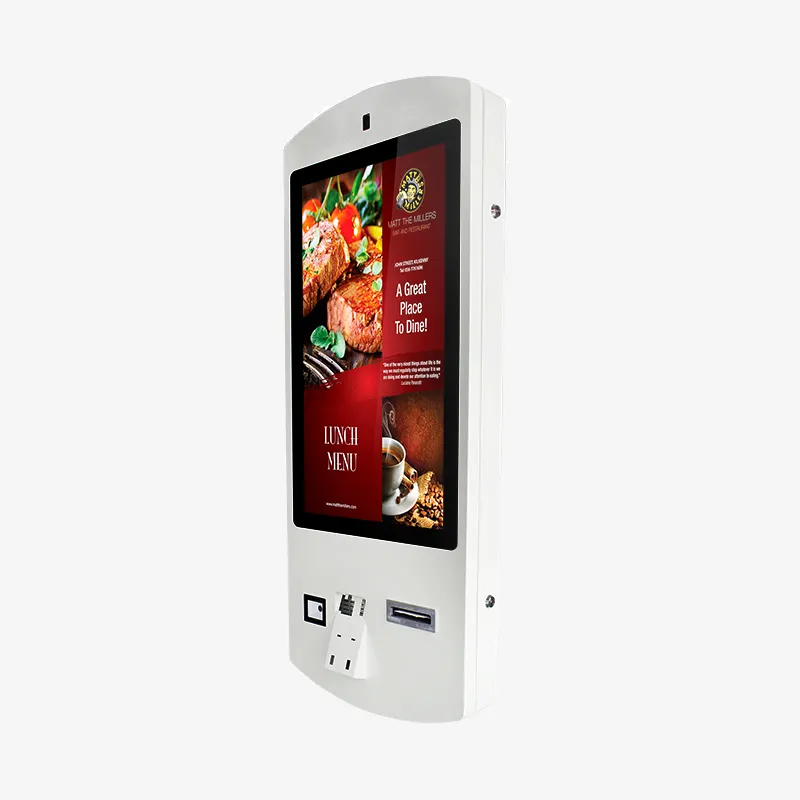
Modern retail and service environments are rapidly transforming through digital automation, with touch screen kiosk technology leading this revolutionary change. Businesses across industries are discovering that implementing interactive self-service solutions can dramatically improve operational efficiency while enhancing customer satisfaction. The integration of touch screen kiosk systems represents a strategic investment that delivers measurable returns through reduced labor costs, increased transaction speed, and enhanced user experiences. These sophisticated digital interfaces are becoming essential tools for companies seeking competitive advantages in today's fast-paced marketplace.
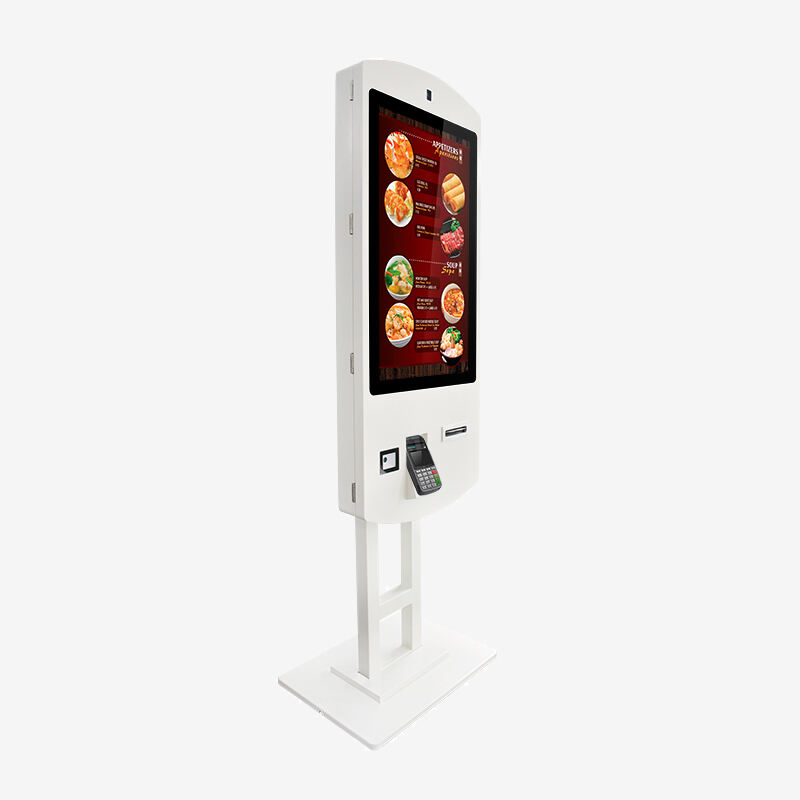
Understanding Touch Screen Kiosk Technology
Advanced Interactive Display Systems
The foundation of any effective touch screen kiosk lies in its advanced interactive display technology, which combines high-resolution screens with precise touch detection capabilities. Modern capacitive touchscreen systems offer superior responsiveness and durability compared to traditional resistive alternatives, providing users with smooth and intuitive navigation experiences. These displays typically feature anti-glare coatings and enhanced brightness levels to ensure optimal visibility in various lighting conditions. The integration of multi-touch functionality allows for more sophisticated user interactions, including pinch-to-zoom gestures and multi-point selection capabilities.
Professional-grade touch screen kiosk units incorporate industrial-strength components designed to withstand continuous operation in high-traffic environments. The display panels utilize tempered glass surfaces that resist scratches, impacts, and chemical exposure while maintaining crystal-clear image quality. Advanced touch sensing technology ensures accurate input detection even when users are wearing gloves or using stylus devices. These systems also feature automatic calibration functions that maintain optimal touch accuracy throughout their operational lifespan.
Robust Hardware Architecture
Contemporary touch screen kiosk solutions are built upon powerful computing platforms that can handle complex software applications and real-time data processing requirements. These systems typically incorporate solid-state storage devices that eliminate mechanical failure points while providing fast data access speeds. The processing units are selected for their reliability and thermal efficiency, ensuring stable operation in demanding commercial environments. Memory configurations are optimized to support multiple concurrent applications and seamless multitasking capabilities.
The physical construction of touch screen kiosk enclosures prioritizes both durability and aesthetic appeal, utilizing materials such as powder-coated steel and aluminum alloys that resist corrosion and wear. Ventilation systems are carefully engineered to maintain optimal operating temperatures without creating noise disturbances in customer-facing environments. Cable management systems ensure clean installations while protecting sensitive connections from damage or tampering. These design considerations contribute to the long-term reliability and professional appearance of deployed units.
Business Benefits and ROI Considerations
Operational Efficiency Improvements
Implementing touch screen kiosk technology delivers immediate improvements in operational efficiency by automating routine customer service tasks and reducing wait times. These systems can handle multiple transactions simultaneously, eliminating bottlenecks that commonly occur at traditional service counters. Staff members can focus on more complex customer needs and value-added services while the kiosk handles standard transactions. This reallocation of human resources typically results in improved overall service quality and customer satisfaction scores.
Data analytics capabilities built into modern touch screen kiosk platforms provide valuable insights into customer behavior patterns and transaction trends. Managers can access real-time reporting dashboards that display key performance metrics such as transaction volumes, peak usage periods, and customer preferences. This information enables data-driven decision making regarding staffing schedules, inventory management, and service optimization strategies. The automated data collection eliminates the need for manual tracking and reduces the risk of human error in reporting processes.
Cost Reduction and Revenue Enhancement
The financial benefits of touch screen kiosk deployment extend beyond simple labor cost savings to include significant improvements in transaction accuracy and processing speed. Automated systems eliminate common human errors such as incorrect order entry or pricing mistakes, reducing refund requests and customer complaints. The consistent presentation of products and services through digital interfaces often leads to increased average transaction values through strategic upselling prompts and promotional offers. These revenue enhancement opportunities can substantially accelerate the return on investment timeline.
Long-term maintenance costs for touch screen kiosk systems are typically lower than traditional point-of-sale equipment due to their solid-state construction and minimal moving parts. Software updates and feature enhancements can be deployed remotely, reducing the need for on-site technical visits. The modular design of modern kiosk systems allows for component-level repairs and upgrades, extending the useful life of the investment while maintaining current functionality standards.
Industry-Specific Applications
Retail Environment Integration
Retail businesses are leveraging touch screen kiosk solutions to create immersive shopping experiences that bridge the gap between online and in-store commerce. These systems enable customers to access comprehensive product catalogs, compare specifications, and read reviews without requiring sales staff assistance. Digital wayfinding capabilities help shoppers navigate large retail spaces efficiently while promotional content displays can highlight special offers and seasonal merchandise. Integration with inventory management systems ensures real-time product availability information, reducing customer frustration and improving sales conversion rates.
Interactive product configurators allow customers to customize orders and visualize their selections in real-time, particularly valuable for furniture, apparel, and electronics retailers. The touch screen kiosk interface can display high-resolution product images, 360-degree views, and augmented reality previews that enhance the decision-making process. Payment processing capabilities enable immediate transactions, reducing the time from product selection to purchase completion. These features create a seamless customer journey that rivals online shopping convenience while maintaining the tactile benefits of physical retail environments.
Food Service and Hospitality Applications
The food service industry has embraced touch screen kiosk technology as a solution to labor shortages and increasing customer expectations for fast, accurate service. Self-service ordering systems allow customers to browse complete menus with detailed descriptions, nutritional information, and customization options at their own pace. Visual menu presentations with high-quality food photography increase order values by making items more appealing and accessible. Language selection features accommodate diverse customer bases, expanding market reach without requiring multilingual staff.
Kitchen integration capabilities ensure that orders placed through touch screen kiosk systems are immediately transmitted to preparation areas with complete accuracy. This direct communication eliminates order transcription errors and reduces preparation times by providing clear, standardized formatting. Customer notification systems can alert patrons when their orders are ready for pickup or delivery, optimizing the overall dining experience. Payment integration supports multiple tender types including contactless cards, mobile payments, and loyalty program redemptions.
Technology Integration and Connectivity
Software Platform Capabilities
Modern touch screen kiosk platforms are built upon flexible software architectures that support rapid customization and integration with existing business systems. Content management systems allow for real-time updates to menus, pricing, promotions, and multimedia content without requiring technical expertise. User interface design tools enable businesses to create branded experiences that align with their visual identity and customer expectations. Application programming interfaces facilitate seamless data exchange with customer relationship management systems, inventory databases, and financial reporting platforms.
Cloud-based management consoles provide centralized control over multiple touch screen kiosk deployments, enabling consistent branding and functionality across all locations. Remote monitoring capabilities alert administrators to system status changes, maintenance requirements, and performance anomalies before they impact customer experiences. Automated backup and recovery systems ensure business continuity while regular security updates protect against emerging threats. These management features reduce the total cost of ownership while maximizing system availability and performance.
Security and Compliance Features
Security considerations are paramount in touch screen kiosk implementations, particularly for applications that handle sensitive customer data and payment information. Advanced encryption protocols protect data transmission between kiosk terminals and backend servers, ensuring compliance with industry standards such as PCI DSS for payment processing. Biometric authentication options provide enhanced security for administrative functions while maintaining user-friendly access for customers. Tamper-resistant hardware designs prevent unauthorized access to internal components and sensitive information.
Regular security audits and vulnerability assessments ensure that touch screen kiosk systems remain protected against evolving threats and attack vectors. Automatic security patch deployment maintains current protection levels without interrupting normal operations. Access control systems limit administrative functions to authorized personnel while maintaining comprehensive audit trails for compliance reporting. These security measures build customer confidence while protecting business assets and reputation.
Implementation and Deployment Strategies
Site Assessment and Planning
Successful touch screen kiosk deployment begins with comprehensive site assessment and strategic planning to optimize placement and functionality. Traffic flow analysis identifies optimal locations that maximize customer accessibility while minimizing operational disruption. Power and network infrastructure requirements must be evaluated to ensure adequate capacity for reliable system operation. Environmental factors such as lighting conditions, temperature variations, and potential vandalism risks influence hardware selection and protective measures.
Space planning considerations include Americans with Disabilities Act compliance requirements, ensuring that touch screen kiosk installations are accessible to users with mobility limitations. Sight line analysis prevents obstructions that could impede visibility or create safety hazards in high-traffic areas. Integration with existing architectural elements and branding schemes ensures that new installations complement rather than detract from the overall environment. These planning steps are essential for achieving maximum utilization and customer satisfaction.
Staff Training and Change Management
Effective staff training programs are crucial for successful touch screen kiosk implementation, ensuring that employees can assist customers and troubleshoot basic issues confidently. Training modules should cover system operation, customer assistance techniques, and escalation procedures for complex problems. Change management strategies help staff understand how kiosk technology enhances rather than replaces their roles, focusing on value-added services and personal customer interactions. Regular refresher training sessions maintain competency levels as software updates and new features are introduced.
Customer education initiatives help users become comfortable with touch screen kiosk interfaces, particularly important for demographics that may be less familiar with digital technologies. On-screen tutorials, help functions, and intuitive user interface design reduce learning curves and support adoption rates. Staff members should be prepared to provide gentle guidance and encouragement to hesitant users while allowing confident customers to proceed independently. This balanced approach ensures that all customer segments can benefit from the technology.
Future Technology Trends
Artificial Intelligence Integration
The integration of artificial intelligence capabilities into touch screen kiosk systems represents the next evolution in self-service technology, offering personalized experiences based on customer preferences and behavior patterns. Machine learning algorithms can analyze transaction history and demographic data to provide customized recommendations and promotional offers. Natural language processing enables voice interaction capabilities that complement touch-based navigation, making systems more accessible and intuitive. Predictive analytics help optimize inventory management and staffing levels based on anticipated demand patterns.
Computer vision technologies enable touch screen kiosk systems to recognize returning customers and automatically load personalized preferences and settings. Facial recognition capabilities can expedite authentication processes while maintaining privacy compliance through secure data handling protocols. Emotion recognition algorithms may eventually allow systems to adjust their interaction style based on detected customer mood or stress levels. These advanced features promise to make touch screen kiosk experiences more human-like and engaging.
Enhanced Connectivity and IoT Integration
Future touch screen kiosk deployments will benefit from enhanced connectivity options including 5G cellular networks that provide high-speed internet access without dependence on local network infrastructure. Internet of Things integration will enable seamless communication with other smart devices and systems throughout the business environment. Sensor networks can provide real-time environmental data that automatically adjusts kiosk operation parameters for optimal performance and user comfort. These connectivity improvements will enable more sophisticated applications and real-time responsiveness.
Edge computing capabilities will allow touch screen kiosk systems to process complex data locally, reducing latency and improving response times for demanding applications. Blockchain technology may provide enhanced security and transparency for transactions while smart contracts could automate complex business processes. Augmented reality overlays will create more immersive experiences that blend digital content with physical environments. These technological advances will continue expanding the possibilities for touch screen kiosk applications across industries.
FAQ
What maintenance requirements do touch screen kiosk systems have?
Touch screen kiosk systems require minimal routine maintenance due to their solid-state construction and durable components. Regular cleaning of the display surface with appropriate cleaning solutions maintains optimal touch sensitivity and visual clarity. Software updates should be applied regularly to ensure security and functionality, though many systems support automatic update deployment. Hardware components typically have multi-year warranties and are designed for continuous operation with minimal intervention required.
How do touch screen kiosk systems handle high-volume usage?
Modern touch screen kiosk platforms are engineered to handle high-volume usage through robust hardware specifications and efficient software optimization. Industrial-grade components provide reliable operation under continuous use while advanced cooling systems maintain optimal operating temperatures. Queue management features can direct customers to available units during peak periods while load balancing distributes processing demands across multiple systems. Performance monitoring tools alert administrators to potential capacity issues before they impact customer experiences.
Can touch screen kiosk systems integrate with existing business software?
Yes, contemporary touch screen kiosk platforms offer extensive integration capabilities through standardized application programming interfaces and database connectivity options. These systems can connect with point-of-sale systems, inventory management databases, customer relationship management platforms, and financial reporting tools. Real-time data synchronization ensures consistent information across all business systems while automated data exchange reduces manual entry requirements. Professional integration services are typically available to ensure seamless connectivity with legacy systems.
What security measures protect touch screen kiosk systems from fraud?
Touch screen kiosk systems incorporate multiple layers of security including encrypted data transmission, secure payment processing compliance, and tamper-resistant hardware design. Payment card industry standards are strictly followed for all financial transactions while biometric authentication options provide enhanced access control for administrative functions. Regular security audits and automatic patch deployment maintain current protection levels against emerging threats. Comprehensive logging and monitoring systems provide audit trails for compliance and fraud investigation purposes.