EN
EN


Selecting the right interactive flat panel for your organization requires careful consideration of numerous technical specifications and functional capabilities. Modern interactive flat panel displays have evolved significantly from traditional whiteboards and projectors, offering advanced touch technology, superior visual quality, and seamless integration with digital workflows. Understanding the essential features that distinguish high-quality interactive flat panel solutions from basic models can help decision-makers make informed investments that will serve their needs for years to come. The complexity of available options in today's market demands a systematic approach to evaluating interactive flat panel specifications and performance characteristics.
Display Quality and Visual Performance Standards
Resolution Requirements and Display Clarity
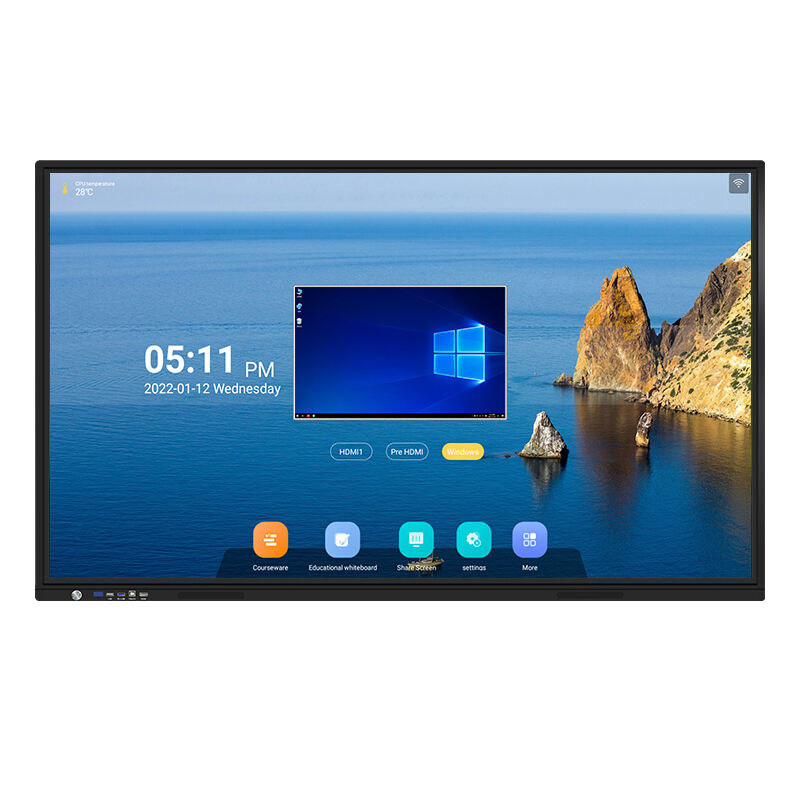
The foundation of any effective interactive flat panel lies in its display resolution and overall visual performance capabilities. Modern professional-grade interactive flat panel systems typically feature 4K Ultra HD resolution as the baseline standard, providing crisp text rendering and detailed image reproduction essential for educational and business applications. Higher resolution displays ensure that fine details remain visible even when viewed from various distances within a room, maintaining readability for both presenters and audience members. The pixel density directly impacts the quality of handwritten annotations and digital content display, making resolution a critical factor in interactive flat panel selection processes.
Color accuracy and brightness specifications significantly influence the effectiveness of interactive flat panel installations in different lighting environments. Professional interactive flat panel displays should maintain consistent color reproduction across various viewing angles and ambient lighting conditions. Anti-glare treatments and high brightness ratings enable interactive flat panel systems to perform effectively in brightly lit conference rooms and classrooms without compromising visibility. The combination of superior resolution and optimized brightness ensures that interactive flat panel technology delivers professional presentation quality regardless of environmental factors.
Panel Technology and Durability Considerations
The underlying panel technology determines both the longevity and performance characteristics of interactive flat panel systems. LED backlighting technology provides energy efficiency and extended operational lifespans compared to traditional display technologies, making it the preferred choice for professional interactive flat panel installations. Advanced panel construction includes tempered glass surfaces that resist scratches and impacts while maintaining responsive touch sensitivity. These durability features ensure that interactive flat panel investments continue delivering reliable performance throughout extended deployment periods in high-traffic environments.
Environmental resistance specifications protect interactive flat panel systems from dust, moisture, and temperature fluctuations commonly encountered in educational and corporate settings. Robust construction standards enable interactive flat panel displays to maintain consistent performance across varied installation environments. The combination of durable materials and professional-grade components ensures that interactive flat panel technology provides reliable service throughout typical equipment replacement cycles, maximizing return on investment for organizations implementing these advanced display solutions.
Touch Technology and User Interaction Capabilities
Multi-Touch Functionality and Precision
Advanced touch technology represents a fundamental differentiating factor among interactive flat panel options available in today's market. Professional-grade interactive flat panel systems support simultaneous multi-user interaction, enabling collaborative work sessions where multiple participants can manipulate content simultaneously. The precision and responsiveness of touch detection directly impact user experience quality, with superior interactive flat panel models providing palm rejection and fine-tip stylus support for detailed annotation work. Touch latency measurements indicate how quickly an interactive flat panel responds to user input, with minimal delays essential for natural writing and drawing experiences.
Capacitive touch technology offers superior accuracy and durability compared to resistive alternatives, making it the preferred choice for professional interactive flat panel installations. Advanced touch algorithms distinguish between intentional gestures and accidental contact, ensuring that interactive flat panel systems respond appropriately to user intentions. The ability to recognize various input methods, including fingers, styluses, and specialized tools, enhances the versatility of interactive flat panel technology across different application scenarios and user preferences.
Gesture Recognition and Navigation Features
Sophisticated gesture recognition capabilities expand the functional possibilities of modern interactive flat panel systems beyond basic touch interaction. Professional interactive flat panel displays support intuitive multi-finger gestures for zooming, rotating, and navigating digital content without requiring specialized training. These natural interaction methods make interactive flat panel technology more accessible to users with varying technical skill levels. Advanced gesture processing ensures that interactive flat panel systems accurately interpret user intentions while filtering out unintended movements that might disrupt presentation flow.
Customizable gesture libraries allow organizations to tailor interactive flat panel functionality to specific workflow requirements and user preferences. The flexibility to define application-specific gestures enhances productivity by streamlining common tasks within interactive flat panel interfaces. Integration with operating system gesture standards ensures that interactive flat panel technology provides familiar navigation experiences that align with users' existing device interaction patterns and expectations.
Connectivity Options and Integration Capabilities
Wireless and Wired Connection Standards
Comprehensive connectivity options determine how effectively interactive flat panel systems integrate with existing technology infrastructure and mobile devices. Modern interactive flat panel displays feature multiple HDMI ports, USB connections, and wireless display capabilities that accommodate diverse device types and presentation scenarios. Wireless screen mirroring functionality enables seamless content sharing from laptops, tablets, and smartphones without requiring physical cable connections. The availability of various connection standards ensures that interactive flat panel technology remains compatible with both current and future device ecosystems.
Network integration capabilities allow interactive flat panel systems to connect with organizational IT infrastructure for remote management and content distribution. Ethernet connectivity enables centralized administration of multiple interactive flat panel installations, streamlining software updates and configuration management. Advanced interactive flat panel models support secure wireless protocols that maintain data protection standards while enabling flexible device connectivity options throughout educational and corporate environments.
Software Compatibility and Platform Support
Operating system compatibility ensures that interactive flat panel technology integrates smoothly with existing software applications and workflows. Professional interactive flat panel systems typically support multiple operating environments, including Windows, macOS, Android, and specialized educational platforms. Cross-platform compatibility eliminates the need for organizations to modify existing software investments when implementing interactive flat panel solutions. Application-specific optimization enhances the performance of common productivity tools and educational software within interactive flat panel environments.
Cloud service integration expands the capabilities of interactive flat panel technology by enabling access to remote resources and collaborative platforms. Modern interactive flat panel displays support popular cloud storage services and video conferencing applications, facilitating hybrid work and learning scenarios. The ability to access cloud-based content directly through interactive flat panel interfaces streamlines workflow processes and reduces the complexity of managing digital resources across multiple platforms and devices.
Performance Specifications and Technical Requirements
Processing Power and System Resources
The internal processing capabilities of interactive flat panel systems directly influence their ability to handle complex applications and multi-tasking scenarios. Professional-grade interactive flat panel displays incorporate powerful processors and sufficient RAM to ensure smooth operation when running multiple applications simultaneously. System performance specifications determine how effectively interactive flat panel technology can process high-resolution content, complex calculations, and resource-intensive educational or business applications without experiencing lag or reduced responsiveness.
Memory and storage specifications impact the ability of interactive flat panel systems to cache frequently used applications and store local content for offline access. Adequate storage capacity enables interactive flat panel displays to maintain performance levels even when internet connectivity becomes unreliable. The combination of processing power and memory resources ensures that interactive flat panel technology delivers consistent user experiences across various application scenarios and usage intensity levels throughout typical operational periods.
Audio Capabilities and Sound Quality
Integrated audio systems significantly influence the overall effectiveness of interactive flat panel installations in presentation and educational environments. Professional interactive flat panel displays feature high-quality speakers positioned to provide clear audio distribution throughout typical room configurations. Audio processing capabilities should include noise cancellation and echo reduction features that enhance voice clarity during video conferencing and remote collaboration sessions. The quality of built-in audio components can eliminate the need for external speaker systems, simplifying installation requirements and reducing total system complexity.
Advanced audio features, including wireless microphone support and audio mixing capabilities, expand the versatility of interactive flat panel systems in professional environments. The ability to connect external audio devices and integrate with existing sound systems enhances the flexibility of interactive flat panel installations across different venue types and acoustic requirements. Professional-grade audio processing ensures that interactive flat panel technology delivers clear communication capabilities essential for effective presentations and collaborative work sessions.
Installation Requirements and Environmental Considerations
Mounting Options and Physical Specifications
Physical installation requirements significantly influence the total cost and complexity of implementing interactive flat panel solutions in various environments. Wall mounting capabilities and VESA compliance standards determine the compatibility of interactive flat panel displays with existing mounting hardware and installation infrastructure. Weight specifications and dimensional requirements affect the structural modifications needed to accommodate interactive flat panel installations in different room configurations. Professional installation considerations include cable management, power requirements, and ventilation needs that ensure optimal interactive flat panel performance throughout extended operational periods.
Mobile cart compatibility expands the deployment flexibility of interactive flat panel systems, enabling organizations to share displays across multiple locations and room configurations. Portable mounting solutions allow interactive flat panel technology to serve various functions throughout facilities without requiring permanent installation modifications. The availability of height-adjustable mounting options ensures that interactive flat panel displays can accommodate users of different heights and accessibility requirements, maximizing the inclusivity of interactive presentation environments.
Power Management and Energy Efficiency
Energy consumption specifications directly impact the operational costs associated with interactive flat panel installations over their service lifespans. Energy-efficient interactive flat panel systems reduce electricity costs while supporting organizational sustainability initiatives and environmental responsibility goals. Advanced power management features, including automatic standby modes and scheduled power cycling, optimize energy usage based on actual utilization patterns. These efficiency features ensure that interactive flat panel technology minimizes environmental impact while maintaining availability when needed for productive activities.
Thermal management capabilities ensure that interactive flat panel systems maintain optimal performance levels while managing heat generation effectively. Efficient cooling systems and thermal design prevent overheating issues that could degrade display quality or reduce component lifespans. Professional-grade interactive flat panel displays incorporate temperature monitoring and automatic thermal regulation features that protect sensitive components while maintaining consistent performance characteristics throughout varying environmental conditions and usage intensity levels.
FAQ
What screen size should I choose for my interactive flat panel installation
Screen size selection for interactive flat panel systems should be based on room dimensions, typical audience size, and primary use cases. For standard conference rooms accommodating 8-12 participants, 65-75 inch interactive flat panel displays typically provide optimal visibility and interaction capabilities. Larger spaces and educational environments often benefit from 85-inch or larger interactive flat panel installations that ensure content remains clearly visible from greater distances. Consider the available wall space, viewing angles, and user reach requirements when determining the most appropriate interactive flat panel size for your specific installation environment.
How important is warranty coverage when purchasing an interactive flat panel
Comprehensive warranty coverage represents a critical factor in interactive flat panel selection, as these systems represent significant technology investments with complex electronic components. Professional-grade interactive flat panel displays should include minimum three-year warranties covering both hardware components and software support services. Extended warranty options provide additional protection for organizations planning long-term interactive flat panel deployments. Warranty terms should specifically address touch screen functionality, display panel defects, and on-site service availability to ensure minimal disruption when technical issues arise with interactive flat panel installations.
Can interactive flat panels integrate with existing video conferencing systems
Modern interactive flat panel systems are designed to integrate seamlessly with popular video conferencing platforms and existing communication infrastructure. Most professional interactive flat panel displays support native applications for Zoom, Microsoft Teams, Google Meet, and other leading conferencing services. Built-in cameras, microphones, and speakers in interactive flat panel systems can eliminate the need for separate conferencing hardware while providing superior audio-visual quality. Integration capabilities ensure that interactive flat panel technology enhances rather than complicates existing communication workflows and remote collaboration processes.
What maintenance requirements should I expect with interactive flat panel systems
Interactive flat panel maintenance requirements are generally minimal compared to traditional projection systems, primarily involving regular screen cleaning and software updates. Touch screen surfaces should be cleaned regularly using appropriate cleaning materials that won't damage the anti-glare coatings or touch sensitivity. Software maintenance includes periodic operating system updates and application updates to ensure optimal interactive flat panel performance and security. Professional interactive flat panel systems typically include remote management capabilities that simplify maintenance tasks and enable proactive monitoring of system health and performance metrics across multiple installations.
Table of Contents
- Display Quality and Visual Performance Standards
- Touch Technology and User Interaction Capabilities
- Connectivity Options and Integration Capabilities
- Performance Specifications and Technical Requirements
- Installation Requirements and Environmental Considerations
-
FAQ
- What screen size should I choose for my interactive flat panel installation
- How important is warranty coverage when purchasing an interactive flat panel
- Can interactive flat panels integrate with existing video conferencing systems
- What maintenance requirements should I expect with interactive flat panel systems